

Command Aliases and Hotkeys
To make it even easier to use your favorite Commands, you can set up a Command Alias or Hotkey.
To set them up, go to Settings → Extensions. You can then find the desired Command and add an Alias or a Hotkey.
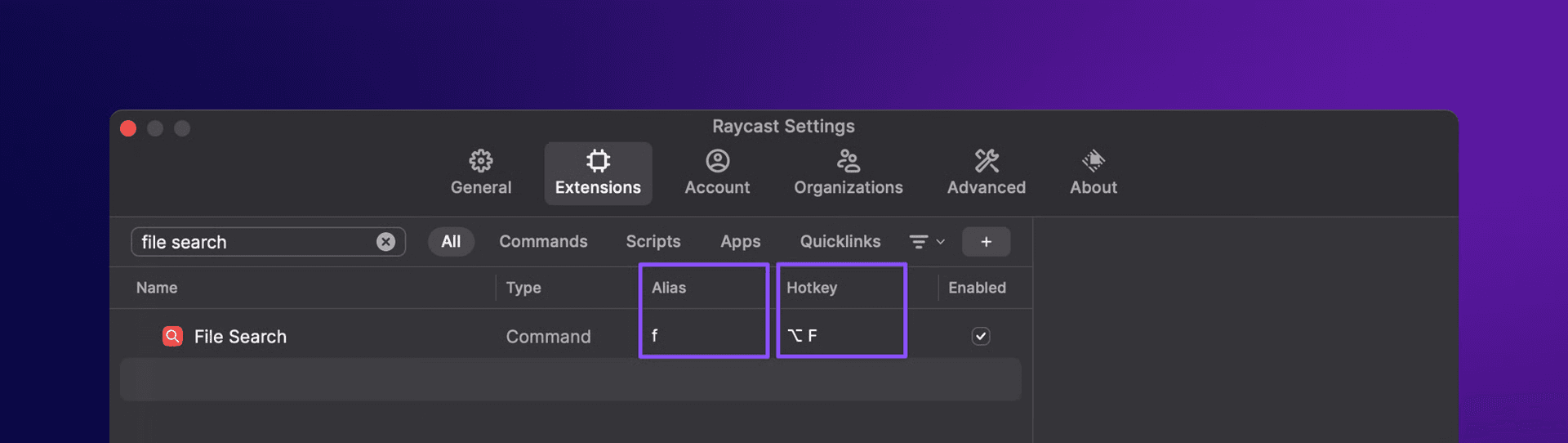
Differences between Aliases and Hotkeys
Depending on your use case, you may want to choose whether to set up an Alias, a Hotkey, or both. Here’s an overview.
Aliases
If you define an alias for your Command, you can type the alias, followed by your search query. Aliases are useful for commands that require arguments, such as a search query.
For example, if you often search for files, you need to use the File Search Command, press⏎ and finally type in your search query. To speed this up let’s assign f as an Alias to the File Search Command. You can now type f followed by a space and your search query.
Hotkeys
Hotkeys are global and always available at your fingertips. It’s the fastest way to run a Command.
For example, if you often use the Center Command from Window Management, you need to open Raycast, search for Center and press ⏎. To speed this up, let’s give it the following Hotkey ⌃ ⌥ ⌘ C. You can now press ⌃ ⌥ ⌘ C from anywhere on your computer to trigger the Center Command.
Hotkeys are useful whether they are a “No View” Command such as Center or a “View” Command such as File Search.