

Focus
Raycast Focus helps you stay in flow and get more done by blocking out distractions on your computer. Define a goal, set a duration, and block (or exclusively allow) distracting apps and websites for the length of your session.
You can group apps and websites into reusable Focus Categories (e.g. "Social Media", "News"), then drop a whole category into a session instead of re-picking everything each time. Sessions live in a panel and can be tucked into the menu bar (macOS) or taskbar (Windows) while you work.
Getting Started
Open Raycast and run Start Focus Session. Fill in the form:
- Goal: what you're focusing on (e.g. "Write the report")
- Duration: pick a length, or leave it as
No Limitfor an open-ended session - Mode:
Block Apps & Websites(block the listed items) orAllow Apps & Websites(block everything except the listed items) - Block / Allow: add apps, websites, or saved Focus Categories
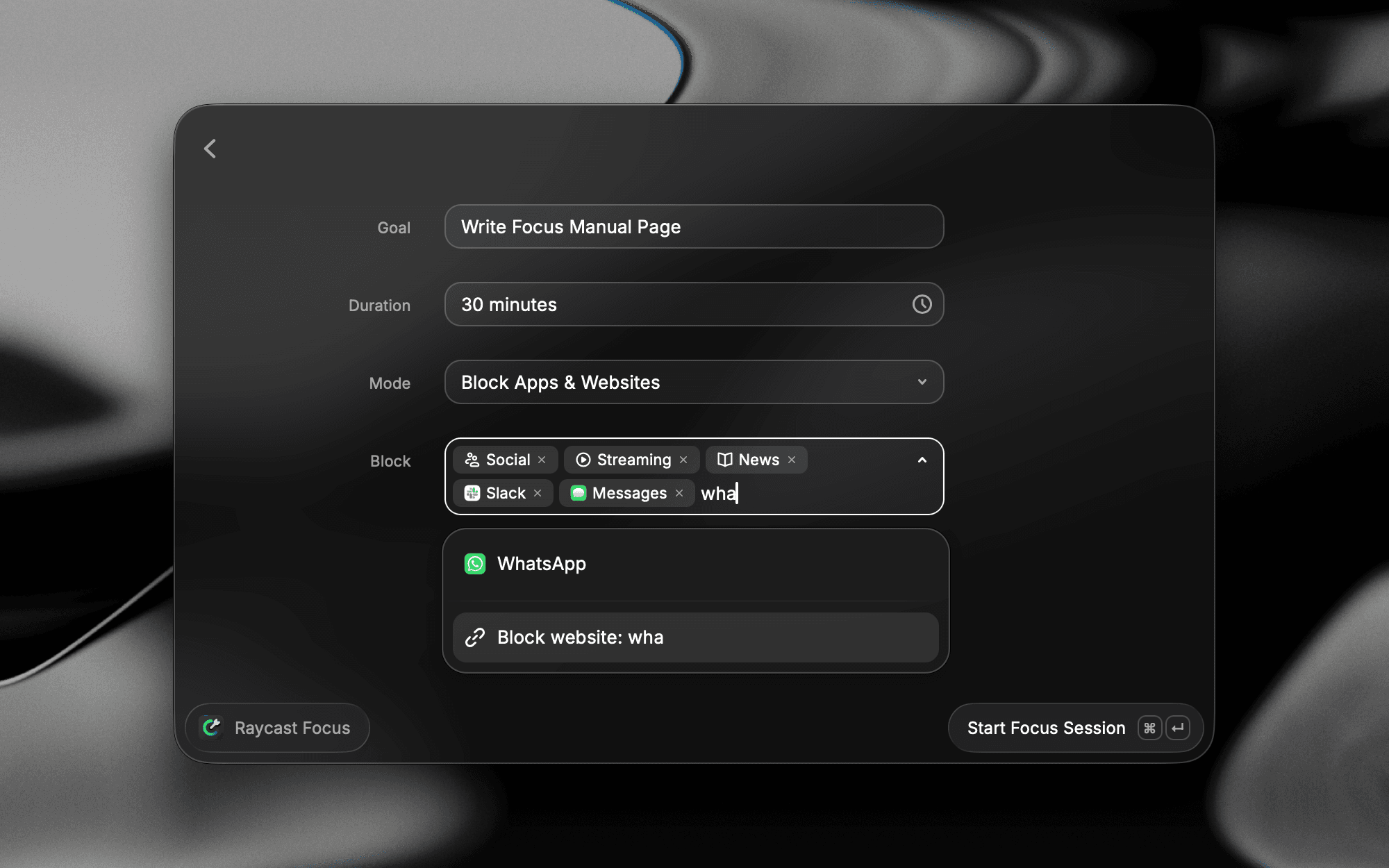
Submit the form (⌘ / Ctrl ↵) to begin. The most-used commands:
- Start Focus Session: opens the configuration form
- Toggle Focus Session: starts with your last-used setup, or stops the current session
- Complete / Pause / Resume / Edit Focus Session: control a running session
- Search Focus Categories / Create Focus Category: manage reusable app/website groups
- Ask Focus (
@raycast-focus): the AI Extension for Focus
Assign a Hotkey or Alias to Toggle Focus Session for one-keystroke start/stop.
How It Works
While a session is running, Raycast enforces your block/allow list at the system level. Launching or switching to a blocked app, or visiting a blocked website, is intercepted. A session panel shows your goal and a countdown (for timed sessions).
Sessions are sleep-aware: if your machine sleeps, the running session is paused automatically and reconciled when you wake. Timed sessions auto-complete when the timer runs out; No Limit sessions run until you complete them manually. Maximum session length is 24 hours.
From the session's Action Panel (⌘ / Ctrl K) you can Restart, Complete, Pause, Resume, or Cancel the session, and move it to / detach it from the menu bar.
Commands
- Start Focus Session: opens the session configuration form where you set your goal, duration, mode, and what to block or allow.
- Toggle Focus Session: starts a new session using your last-used setup, or stops the current session if one is running. Ideal for a single hotkey that drops you in and out of focus.
- Create Focus Category: creates a reusable group of apps and websites you can drop into any session.
- Search Focus Categories: browse and manage your saved Focus Categories.
While you're in a session, there are additional commands:
- Edit Focus Session: add more time, change the block/allow list, or adjust the goal without stopping.
- Complete Focus Session: ends the session early with a celebratory green glow and toast.
- Pause Focus Session: temporarily suspends blocking so you can step away. Pick a predefined break duration and Focus nudges you when it's time to return.
- Resume Focus Session: picks up a paused session where you left off.
Custom Focus Categories
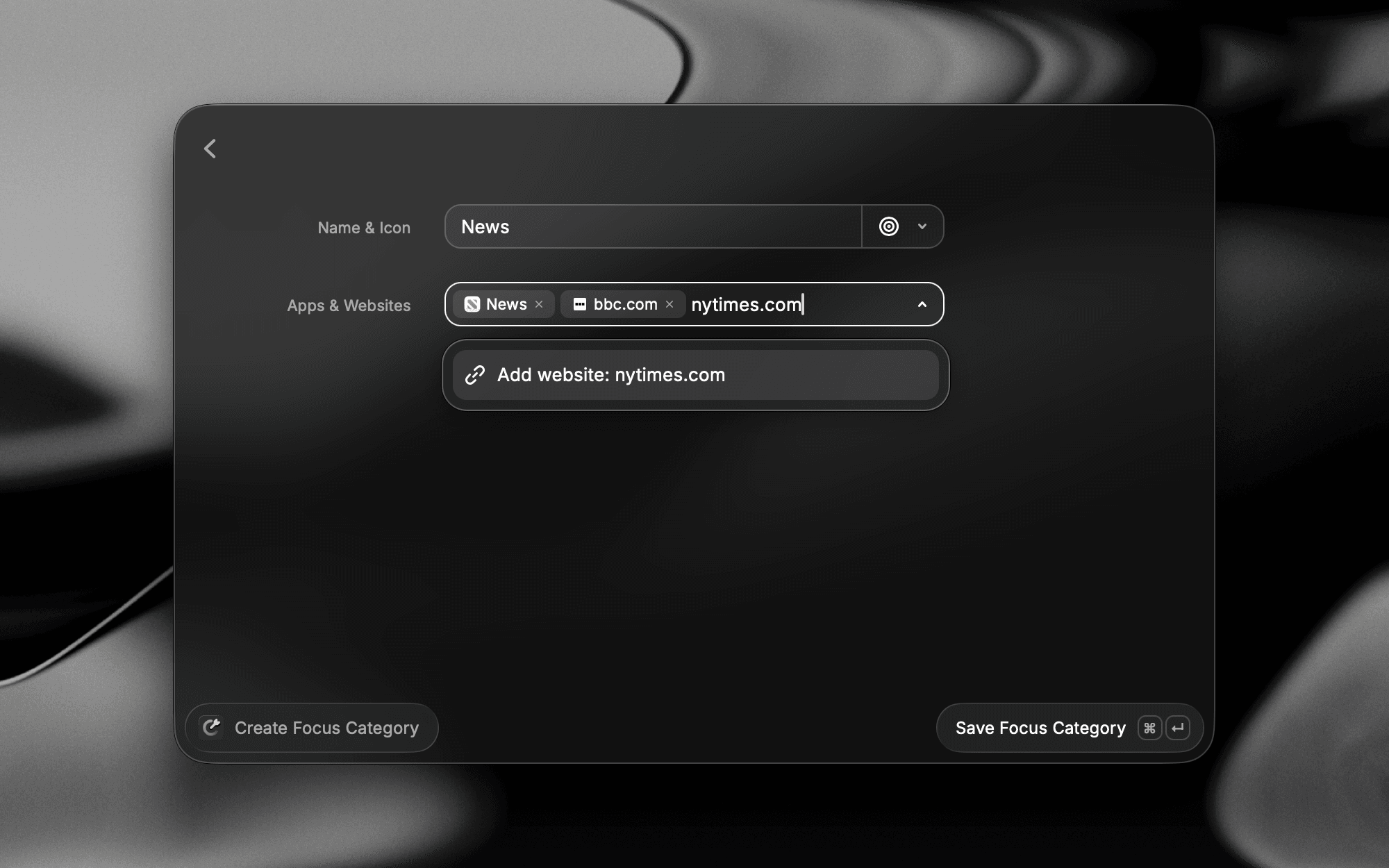
Categories are reusable groups of apps and websites you can drop into any session. Create one with Create Focus Category, then find it later with Search Focus Categories. There are two kinds:
- Built-in: curated by Raycast and not editable, but you can duplicate one and save it under a new title.
- Custom: your own categories, created with Create Focus Category.
Categories work in both Block and Allow modes. For example, group your work apps and apply them in Allow mode, or group distractions and apply them in Block mode.
Tracking
Focus Bar: a window that floats above your other windows, subtly reminding you to stay focused. It shows your progress and lets you pause, complete, or manage the session.
Menu Bar: prefer something more discrete? Hover the Focus Bar and choose Move to Menu Bar (on Windows, Move to Taskbar) under the more menu to show the session there instead.
Blocking
When a session starts, blocked apps quit immediately and blocked websites redirect to a block page. In Block mode the blocked items are the apps and websites you listed; in Allow mode it's everything except the ones you listed, so your allowed apps and sites stay open. If you stumble onto a blocked app during a session, you get an orange glow and a toast to notify you.
If you really need to access blocked content, you can snooze it (3 minutes by default, configurable in Settings → Raycast Focus). After the snooze period you see the blocked overlay, and the app quits once you switch focus.
Set Snooze Duration to No Snooze and the escape hatch goes away completely: no Snooze action is offered on a blocked app at all, so pausing the session is the only way through.
Editing
Need to add more time or block additional apps and websites? Edit a session at any time with Edit Focus Session, or hover the Focus Bar and pick Edit under the more menu.
Taking a Break
Something urgent come up, or time for a brew? Pause the session and pick one of the predefined break durations. Focus steps away and nudges you when it's time to jump back in.
Completing
Finished before the clock hits zero? Complete the session manually for a celebratory green glow and toast. Otherwise it auto-completes when the timer ends, giving you the option to extend or wrap up.
Create a Focus Filter
macOS Ventura (13) and later supports Focus filters, which adjust app behavior based on your active system Focus. Raycast Focus ships a filter that starts a Raycast Focus session whenever a system Focus turns on.
- Open System Settings → Focus and select the Focus you want to customize.
- Scroll down to Focus Filters and choose Add Filter.
- Select "Raycast – Start a focus session".
- Configure the session that starts with the Focus, including the goal and the categories of apps and websites to block.
Apple Shortcuts
Raycast Focus ships two Apple Shortcuts actions: Start Focus Session and Complete Focus Session. Find them in the Shortcuts app sidebar and chain them into larger automations, for example playing music and turning on Do Not Disturb alongside a focus session.
The duration is optional. Leave it out to start a session with no timer, then end it manually or with the Complete Focus Session action.
Ask Focus (AI Extension)
NewThe @raycast-focus AI Extension lets you drive Focus from AI Chat or Quick AI in plain language. Mention @raycast-focus and ask it to start a session with a goal and duration, complete or pause the running session, or explore your past sessions activity — how long you focused, what you blocked, and how your sessions trend over time. Enable or disable it like any other Focus command in Settings → Raycast Focus.
Platform Differences
| Feature | macOS | Windows |
|---|---|---|
| Stash the session UI | Move to Menu Bar | Move to Taskbar |
| App/website blocking | ✅ | ✅ |
| Focus Categories | ✅ | ✅ |
Functionally Focus is equivalent on macOS and Windows; the only real difference is the menu bar vs. taskbar wording.
Tips & Tricks
- Use Allow mode for deep work: list only the 2-3 apps/sites you need and everything else is blocked.
- Build Focus Categories once (e.g. "Distractions") and reuse them across sessions.
- Toggle Focus Session reuses your previous setup, so a single hotkey can drop you back into your usual config.
- Move the session to the menu bar/taskbar to keep the countdown visible without the panel in your way.
- Deeplinks: control sessions from scripts or other apps, e.g.
raycast://focus/start?goal=Deep%20Focus&categories=social,gaming&duration=300&mode=block. Alsoraycast://focus/toggleandraycast://focus/complete. - Natural-language duration: type a timeframe like
until 4:30pm, or pick anything from 5 minutes to a full day.
Settings
Settings → Raycast Focus:
- Snooze Duration: choose how long blocked apps and websites stay snoozed. Pick 1 minute, 3 minutes (default), 5 minutes, 10 minutes, or No Snooze to disable snoozing entirely.
- Play Sound: play sounds for Focus notifications (on by default).
- Restore Terminated Apps: reopen apps Raycast Focus terminated when the session ends (off by default).
- Allow all Websites: allow all websites when a browser is allowed but no specific websites are listed (off by default).
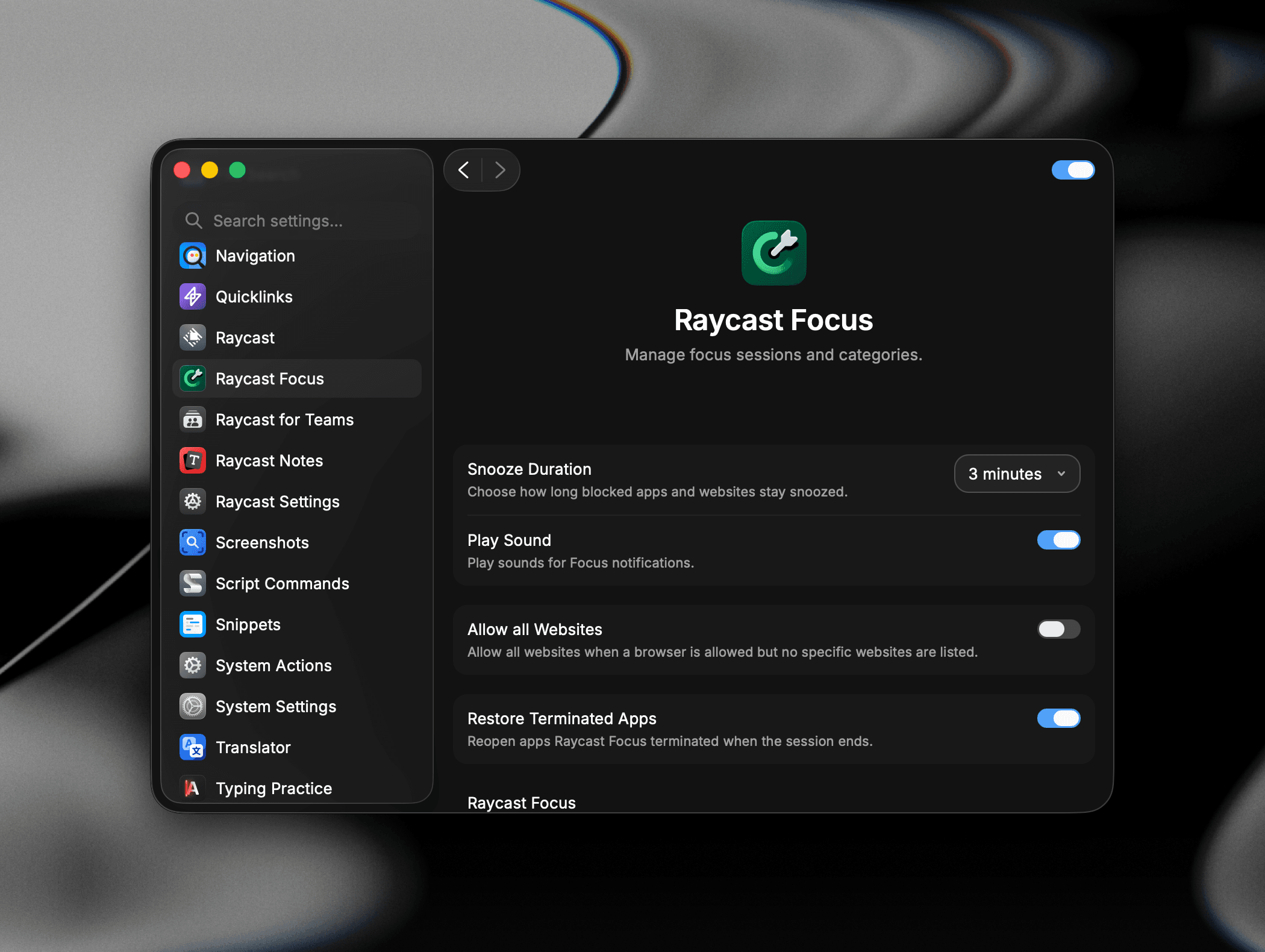
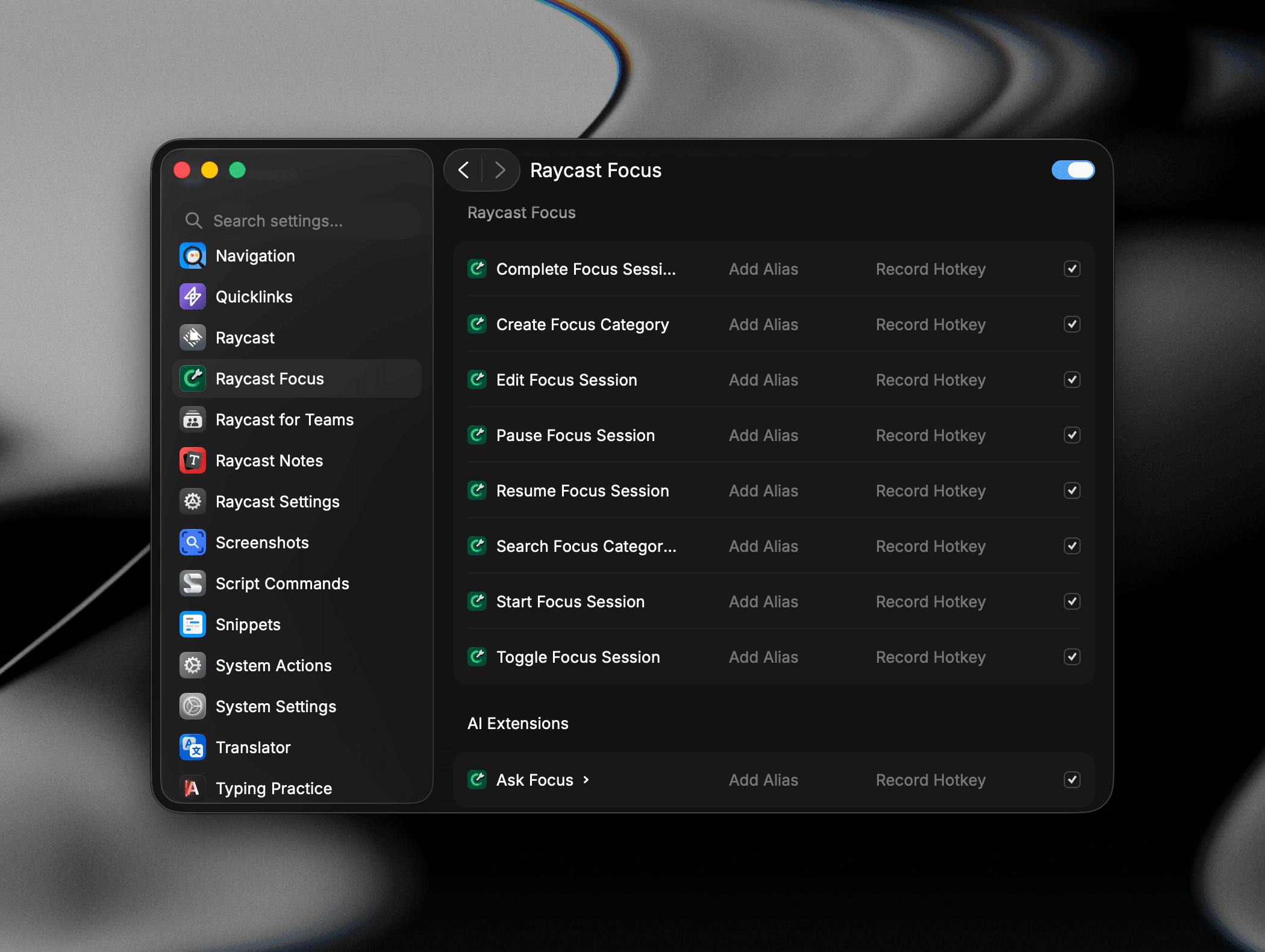
Each Focus command (Start, Toggle, Pause, Resume, Complete, Edit, Search Focus Categories, Create Focus Category, and the Ask Focus AI extension) can be enabled or disabled, and given an alias or hotkey, in Settings → Raycast Focus.
FAQ
Troubleshooting
If Focus isn't working as expected, here are some common issues and steps to resolve them.