

Screenshots
The Search Screenshots command lets you find, preview, and reuse any screenshot or screen recording on your computer without leaving Raycast. Raycast indexes the contents of your screenshots with on-device OCR, so you can search by what's in an image, not just the filename.
Open Search Screenshots from Root Search by typing Search Screenshots and pressing ↵. For faster access, assign an alias (like sc) or a hotkey from the Action Panel (⌘K / CtrlK).
A separate Paste Latest Screenshot command pastes your most recent screenshot directly into the active app, without opening the full view.
Search Filters
Combine free text with prefix-based filters to narrow your results:
name:filters by filename. Example:name:invoice.text:filters by text recognized inside the image (OCR). Example:text:invoice number.date:filters by capture date using natural language. Examples:date:yesterday,date:last week.
Settings
- Column Count: choose how many columns the grid in the Search Screenshots command uses: 3, 4, 5, or 6. Fewer columns mean larger thumbnails; more columns let you scan more screenshots at a glance. You can adjust the number of columns in the Search Screenshots view by using ⌘- / Ctrl- /
+to decrease or increase the column count, or ⌘0 / Ctrl0 to return to the default, or in Settings → Screenshots → Column Count.
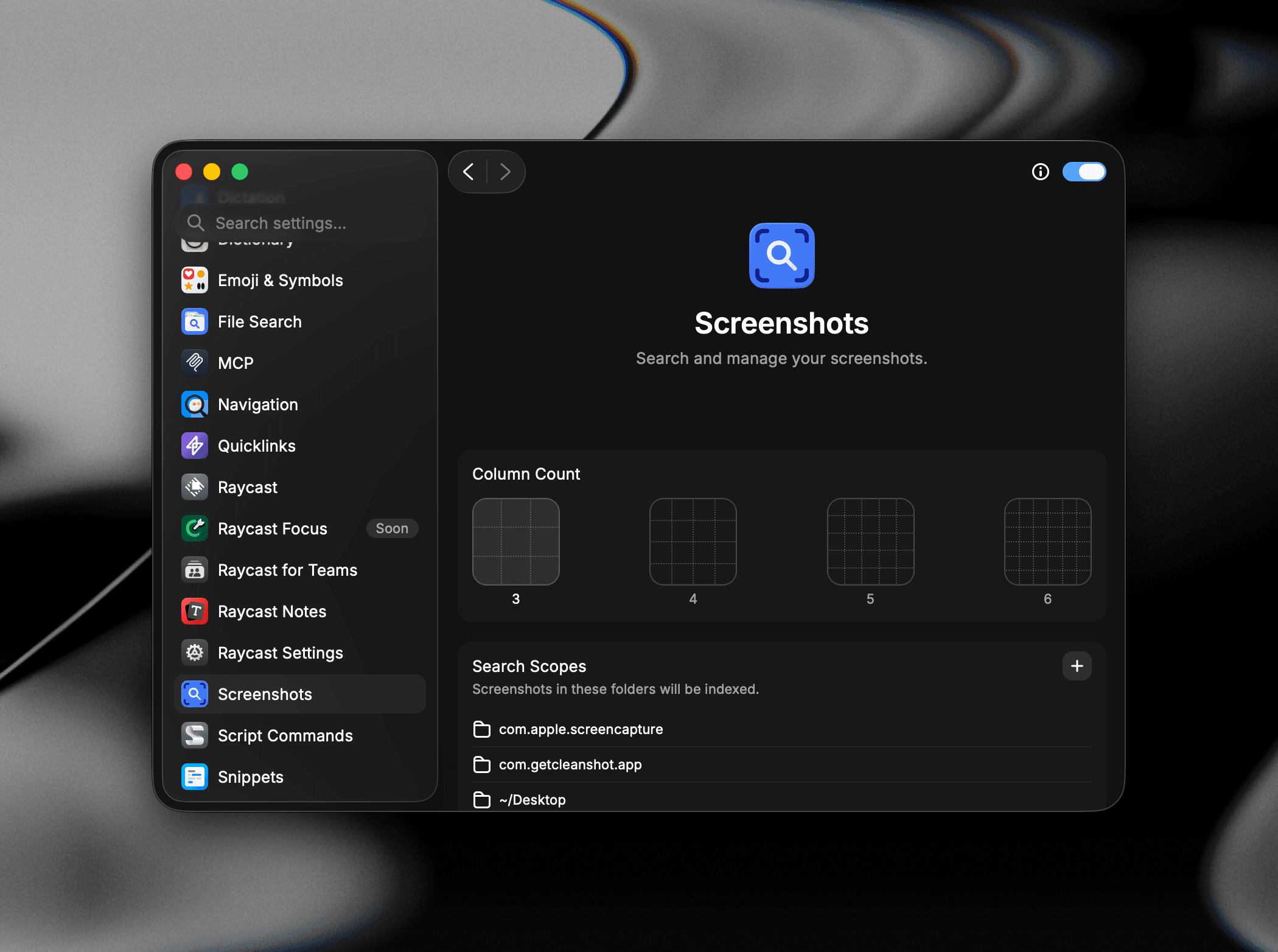
- Search Scopes: the folders Raycast watches and indexes for screenshots. Defaults include the system screenshot location (
com.apple.screencapture), CleanShot X (com.getcleanshot.app), and~/Desktop. Use the+button to add more folders. - Include All Media: when enabled, all images and videos in the watched folders are indexed, not just screenshots. Captures named by a localized macOS, such as
BildschirmfotoorCapture d'écran, are recognized as screenshots without this setting. - Text Recognition: when enabled, text content in screenshots is automatically extracted (OCR) and made searchable. Required for the
text:filter and the Copy Text from Image action. - Recognition Mode: choose between Fast (default) and Accurate. Accurate catches more text but uses more CPU.
- Allow Text Recognition for Cloud Files: when enabled, Raycast downloads cloud-only files (e.g. OneDrive, Dropbox) so it can extract their text.
- Storage Duration: automatically removes older screenshots after the chosen retention window (1 Day, 1 Week, 1 Month, 3 Months, 6 Months, 1 Year, or Unlimited). Pinned screenshots are kept regardless of this setting.
- Commands: manage the two screenshot commands (Search Screenshots and Paste Latest Screenshot). For each one you can assign an alias, record a global hotkey, or enable/disable the command.
Permissions
Screenshots needs file access to read and preview images. Grant Full Disk Access in System Settings → Privacy & Security, or at minimum allow access to Desktop, Documents, and Downloads. Raycast prompts on first launch if permissions are missing.